
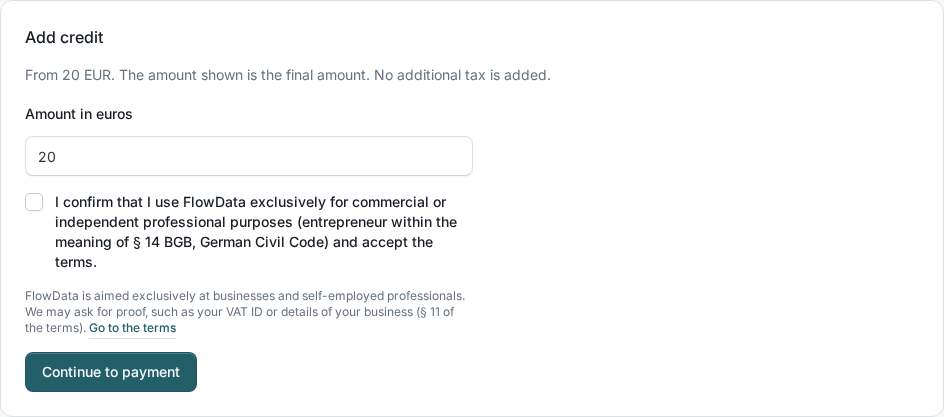
On prepaid, you pay for FlowData from a euro credit balance that belongs to your team. You top it up from 20 EUR on the Billing page. The amount you enter is the final amount, and no tax is added on top.
How to top up
- Open Billing.
- Under Add credit, enter the Amount in euros, for example
25or49.90. - Tick "I confirm that I use FlowData exclusively for commercial or independent professional purposes (entrepreneur within the meaning of § 14 BGB, German Civil Code) and accept the terms."
- Click Continue to payment.
- Complete the payment on the next page.
The credit is available as soon as the payment has been received, so a bank transfer takes correspondingly longer. You receive an invoice for every top-up, see Where can I find my FlowData invoices?.
What the checkbox means
FlowData is aimed exclusively at businesses and self-employed professionals. That is why you confirm before every top-up that you use FlowData for commercial or independent professional purposes, and accept the terms. Without the tick, no top-up starts.
We store your confirmation with the top-up. In individual cases we may ask you for proof, such as your VAT ID or details of your business. The details are in § 11 of the FlowData terms.
What happens when your credit runs out?
If the available credit is not enough, FlowData rejects the request and charges nothing:
| Area | Response | Code |
|---|---|---|
| Data areas | HTTP 402 | insufficient_quota |
| New media jobs | HTTP 429 | insufficient_quota |
Client Info keeps working. Media jobs already in progress are covered by their reservation as long as the video is no longer than assumed. If it is longer and the credit no longer covers it, the job stops and nothing is charged.
After topping up you can carry on right away. It may take a few seconds until rejected requests go through again.
If the code is spend_limit_exceeded, the cause is not your credit but the spend limit of the team or the key, see How does billing work in FlowData?.
Good to know
- Credit does not expire and stays available to your team for FlowData. It is not paid out in cash, but statutory refund rights remain unaffected.
- FlowData credit is separate from FlowAI API credit.
- If your team is on postpaid, there is no credit to top up. Usage is invoiced monthly instead.