
Media jobs run in the background and can take seconds or even an hour depending on the file. So that your software doesn't have to keep asking, FlowData sends a callback to your server as soon as a job has finished or failed. To receive it, set up a webhook endpoint.
Creating an endpoint
- On the left under Media processing, open Webhooks.
- Click Create endpoint.
- Enter your server's URL. It must start with
https://and be publicly reachable. - Optional: enter what the endpoint is for under Description (optional).
- Choose the Events:
job.finishedfor finished jobs andjob.failedfor failed ones. - If needed, tick Default endpoint. More on that below.
- Click Save.
Right after that, FlowData shows the Signing secret. It starts with whsec_. Copy it immediately and store it on your server, as it's shown only this once. Confirm with I have saved the secret.
The list of endpoints
For each endpoint you'll see the URL with description and ID, the subscribed Events, the Status (Active or Inactive, plus the Default badge) and the result of the Last test.
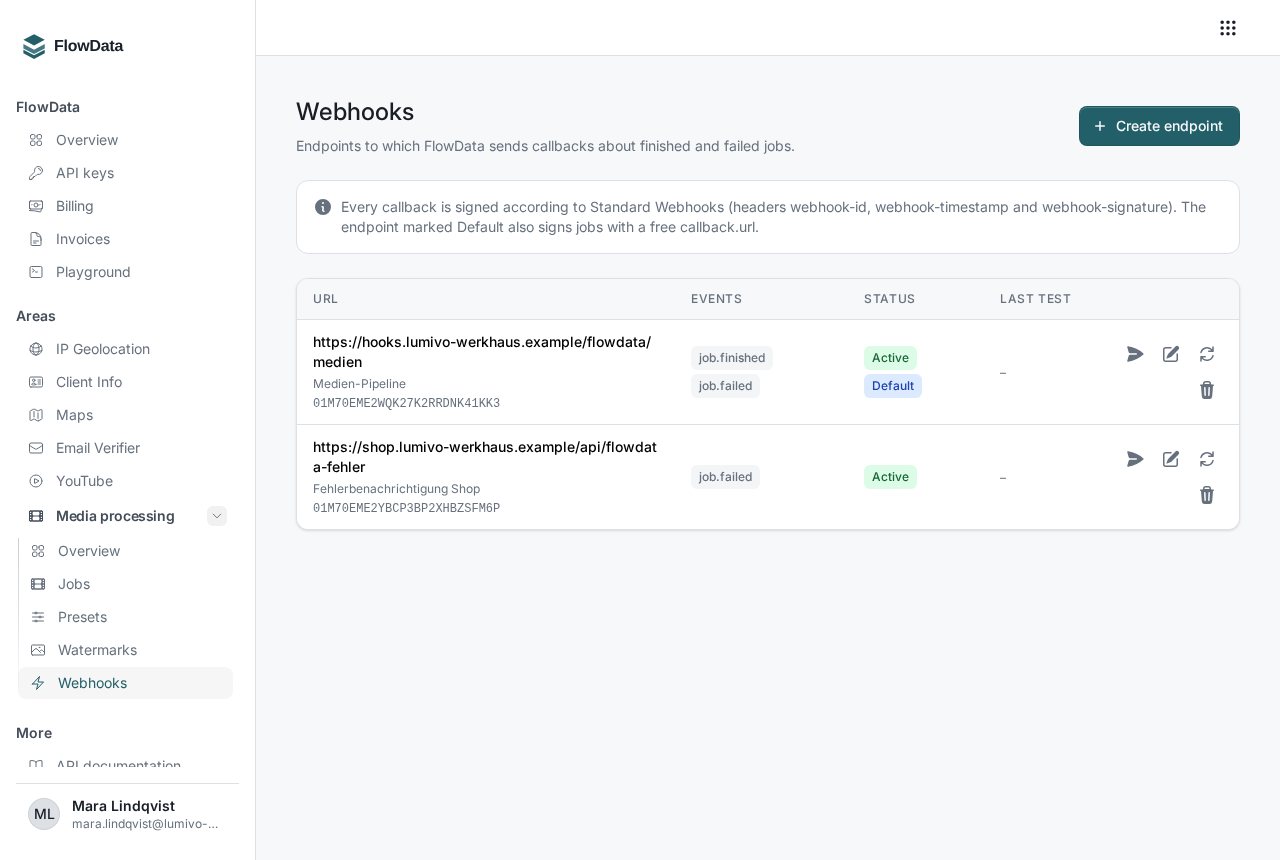
The actions are on the right of each row:
- Send test delivery: sends a test callback with the event
webhook.testto your server, so you can check that it's reachable and responding. - Edit: change the URL, description, events and default setting. You can also pause an endpoint here with Active. Inactive endpoints receive no callbacks and can't be used in new jobs.
- Rotate secret: creates a new signing secret. The previous one keeps signing for 24 hours, so you can switch your server over without downtime.
- Delete: removes the endpoint. Open deliveries to it are given up.
Endpoints can also be listed, created and deleted through the API at https://api.flowdata.one/v1/media/webhook-endpoints.
Using an endpoint in a job
In the job, give the endpoint ID, which appears under the URL in the list:
"callback": { "endpoint_id": "YOUR_ENDPOINT_ID" }
Alternatively you can give a free address with "callback": { "url": "https://…" }. FlowData signs those callbacks with the secret of the Default endpoint. If there's no default endpoint, they're sent unsigned. Each team has at most one default endpoint.
Verifying callbacks
Each callback is signed according to the open "Standard Webhooks" standard and contains the headers webhook-id, webhook-timestamp and webhook-signature. The body contains the event, the job with all its outputs and your metadata. Common Standard Webhooks libraries verify the signature without any code of your own. The exact method with an example is in the media processing API documentation.
Your server should:
- check the signature against the unmodified body and reject timestamps that differ by more than five minutes
- respond with a 2xx status within ten seconds (redirects are not followed)
- skip any
webhook-idit has already processed, since it stays the same on retries
If a delivery fails
If your server doesn't respond in time or returns an error, FlowData retries the delivery up to seven times at increasing intervals from 30 seconds to 6 hours. In a job's detail view, Webhook deliveries shows the status of each callback:
- Pending: the delivery is still on its way
- Delivered: your server has accepted it
- Retrying: the last attempt failed, and the Next attempt is shown next to it
- Given up: all attempts have failed
Once your server is reachable again, click the arrow icon Send again to trigger the delivery right away. More about the detail view is in How do I track the status of my media jobs?.