
Every media job runs through several steps in the background. In FlowData you can always see where a job stands, which outputs are ready and why a job may have failed. The detail view updates itself while a job is running.
The job list
On the left under Media processing, open Jobs. The Media jobs list shows all your team's jobs with Pipeline, Status, creation time and Processing time. The job ID appears under the reference.
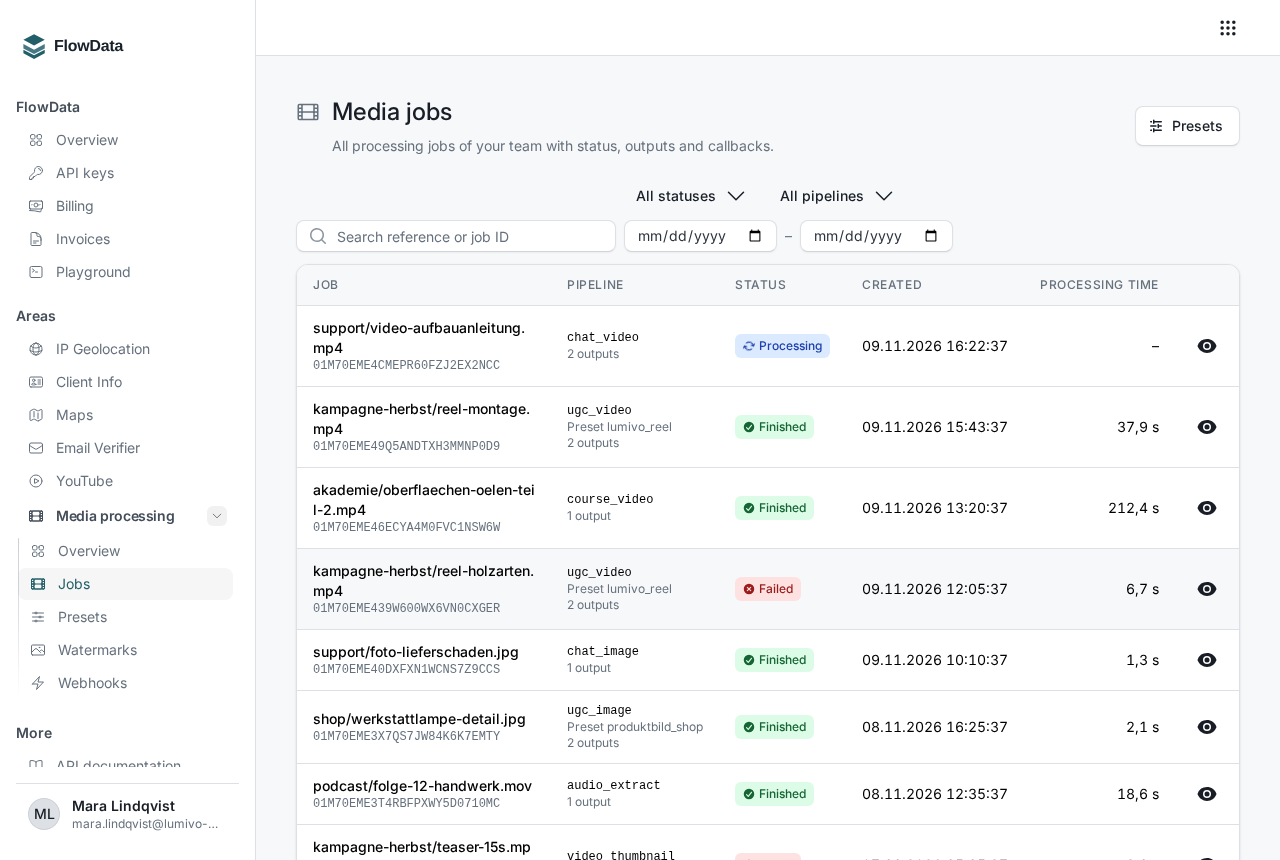
To find a specific job:
- Enter your reference or the job ID in the search field.
- Filter with All statuses or All pipelines.
- Narrow the period with Created from and Created until.
- Reset filters shows all jobs again.
Use the eye icon on the right to open the details.
Statuses at a glance
| Status | API value | Meaning |
|---|---|---|
| Queued | queued |
The job has been accepted and is waiting for a free slot. |
| Downloading | downloading |
FlowData is fetching the input file. |
| Processing | processing |
The file is being converted. |
| Uploading | uploading |
The results are being sent to their destination. |
| Finished | finished |
All outputs have been created and uploaded. |
| Failed | failed |
The job ended with an error. |
| Cancelled | cancelled |
The job was cancelled before it started. |
Course videos and audio tracks run in their own long queue, so Queued can take a while there.
The detail view
At the top you'll find the reference, status and job ID. Below that:
- Overview: pipeline, team preset, priority, source, watermark, where the callback goes, the Processing time and your metadata
- Input: size, file type, dimensions, duration, codec and whether there's an audio track. FlowData automatically converts HDR videos to standard color (SDR).
- Timeline: when the job was created, started and ended
- Outputs: each output with its status (Pending, Uploaded or Failed), size and dimensions
- Webhook deliveries: the callbacks to your server
Understanding errors
A failed job shows a red Error box at the top with the error code, an explanation, the stage where it happened and the note retrying makes sense or retrying does not help.
| Code | Meaning | What you can do |
|---|---|---|
input_not_found |
The input file has expired, been deleted or is blocked. | Create a new link and create a new job. |
input_download_failed |
The file couldn't be downloaded temporarily. | Try again. |
input_too_large |
Size, duration or dimensions are above the limit. | Reduce the file or choose a pipeline for long videos. |
input_unreadable |
The file is damaged or not supported. | Check the file or export it again. |
input_no_video_stream, input_no_audio_stream |
The expected track is missing. | Use a suitable file or pipeline. |
processing_failed |
Conversion or quality check failed. | Check the file, contact support if needed. |
output_upload_failed |
The result couldn't be sent to your upload URL. | Try again and check your storage. |
output_url_expired |
Your put_url has expired or was rejected. |
Use a URL that stays valid longer. |
timeout |
The maximum processing time was exceeded. | Try again, for very large files choose a pipeline for long videos. |
insufficient_quota, spend_limit_exceeded |
The balance, credit line or a spend limit wasn't enough for the actual length. | Top up your balance or adjust the limit. |
forbidden |
The key was deactivated during processing. | Use a valid key. |
cancelled |
The job was cancelled during processing. | Create it again if needed. |
internal_error |
An error on our side. | Try again. |
You can't restart a failed job. Create a new job instead, with a new Idempotency-Key. With the old one you'd just get the failed job back within 24 hours.
Outputs that were already uploaded remain available and are charged, even if the job as a whole failed.
Cancelling a job
As long as a job isn't finished, you'll see Cancel job at the top right. A waiting job ends immediately, the reserved balance is released, and no callback is sent to your server. A running job stops within a few seconds, then shows as Failed with the code cancelled and reports job.failed.
Through the API this is DELETE https://api.flowdata.one/v1/media/jobs/{id}. A job that has already ended can't be cancelled, and the API answers with 409 conflict.
Good to know
- Job data is kept for 90 days, outputs stored by us for 7 days. How to download them is explained in How do I download the results of a media job?.
- If a webhook delivery failed, the row shows the HTTP status and the Next attempt. Use the arrow icon Send again to trigger the delivery manually.